

This week, I'd like to take a break from all of the talk about AI and shift to a quieter, foundational challenge that still haunts most organizations:
How do you know your data migration actually worked?
Like what you see? Want to see more? I invite you to chat with my team at Shinydocs.
It’s one thing to move files from a shared drive to SharePoint or OpenText.
It’s another thing entirely to prove everything made it over (without corrupting files!), is in the right place, with the right metadata, and without introducing future problems.
Here's what I see all too often:
The files are technically “migrated,” AND no one can verify what’s missing!!!
When you're dealing with the scale of millions of documents, that’s a big risk.
If I bet you a million dollars that I could find every document that you migrated, would you take the bet?
Likely not, because you didn't use any reliable method to verify it.
3 Ways to Take the Guesswork Out of Migrations
1. Know What You Have First
Before you migrate anything, you need visibility into what you’re working with.
For example, at my company, our process starts with discovery dashboards and automated reporting. The first step with us is to inventory your current state to determine: what content you have, where it’s located, and how it’s used.
That gives you clarity on how to prioritize, restructure, or clean before the move, all in an easy-to-understand dashboard like this:
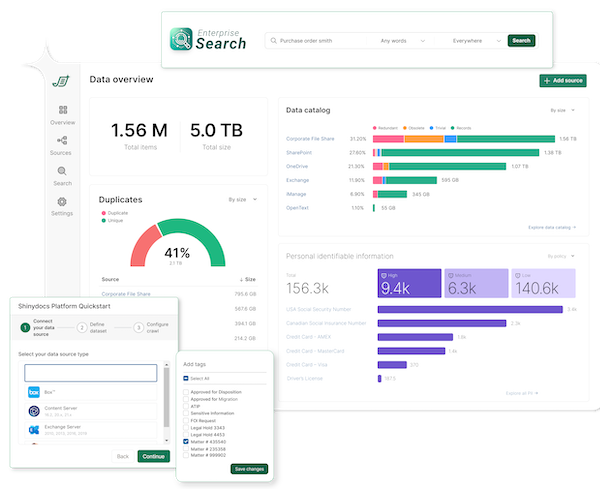
Bonus: These same dashboards will become your best friend after the migration, too.
2. Make Smart Migration Decisions Now!
Ever heard the phrase “garbage in, garbage out”? That’s especially true with content migration.
Step 1 not only helps you learn what you have, but also helps you identify what you don't have.
Are you missing metadata? Now's the time to add it.
Need to change your taxonomy? No problem.
This is your opportunity to fix what's broken. Don't carry over clutter or confusion.
Note: Shinydocs makes it easy to enrich your data before the move by improving metadata, adjusting your taxonomy, or tagging content that no longer needs to be migrated at all.
3. Migrate With Confidence (and Evidence)
This 3rd step is the most important. You want to be confident that everything has been migrated.
But, with millions of documents, it's not always an option to manually check.
With Shinydocs, you’re not just moving files blindly from A to B. You’re mapping the source to the destination, with dashboards to provide confirmation.
So when stakeholders ask, “Did everything come across?” you’ll have a clear, confident answer.
Moving Beyond Manual: Why Dashboard Reporting Changes Everything
If you’re thinking about migrating from a legacy file share to a cloud ECM like SharePoint or OpenText, don’t just think about how to move the data.
Think about how you’ll verify it got there.




Comments